How we made our five-second Genjutsu AI hero video
Our homepage compares a black-and-white dancer with a neon 3D version in one looping video. This production note documents our actual generation files and edit decisions, including where the model output needed correction.
Production notes by Genjutsu AI · Operator: YUAN JUN
Tested October 6, 2026 · Published October 7, 2026
What we used
- Character pass
- 10 seconds · 960 × 720 · 30 fps · 4:3 input
- Character reference
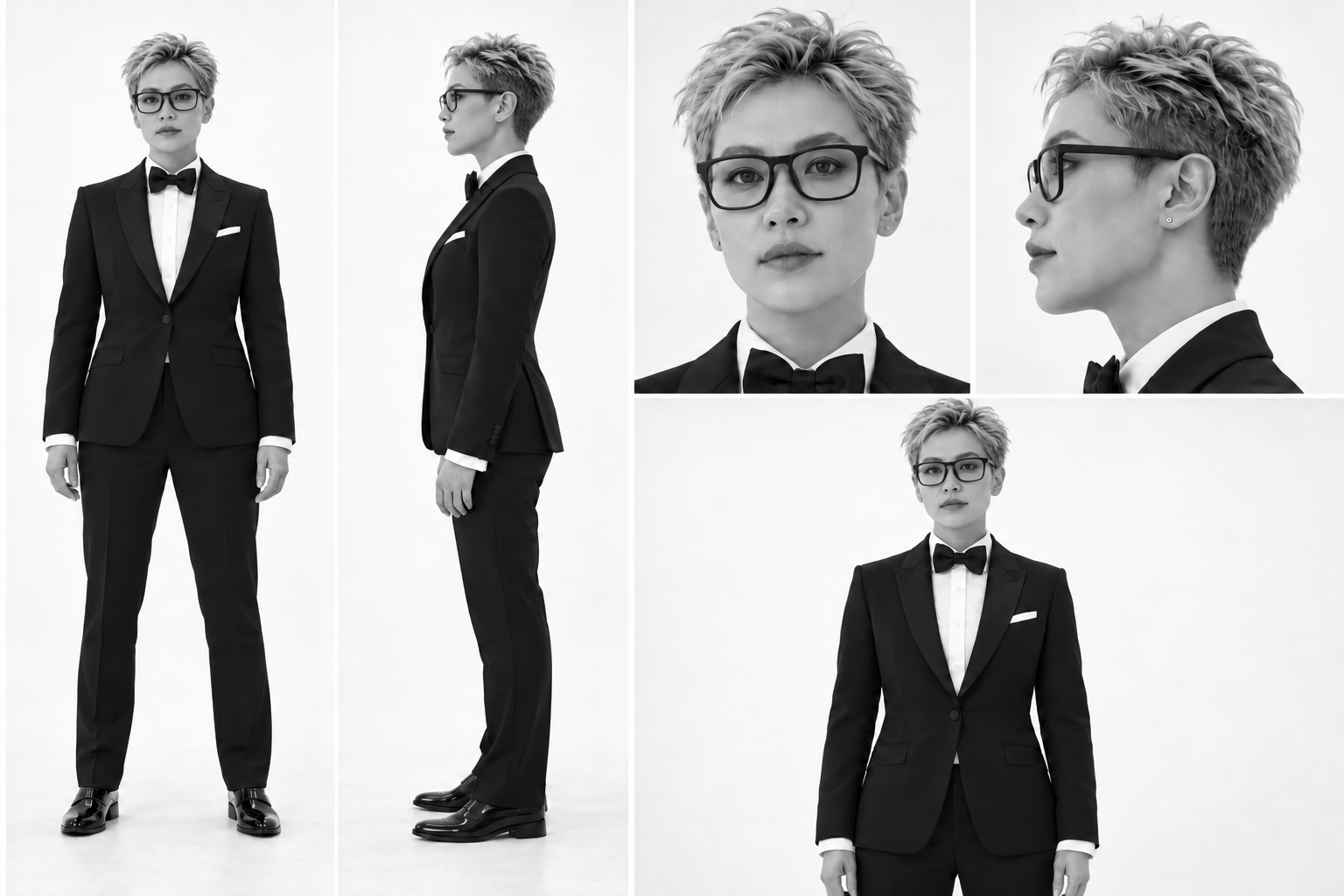
- One sheet, five views of the same dancer wearing glasses
- Model
- Higgsfield Genjutsu Motion Transfer v1.0
- Style pass
- First 5 seconds of the generated master · 720p request
- Restyle preset
- Neon Graphic Cinematic 3D
- Web export
- 1280 × 720 · H.264 MP4 · 24 fps · 5 seconds
The two versions before the moving split
Start with one consistent character
The first pass used a ten-second, 4:3 performance clip to guide the movement and framing. Our reference sheet showed a fictional female dancer from the front, side and closer views. We asked for the same face, hairstyle, suit and black-framed glasses in every visible instance, including the smaller background figures. The source performance remains a separate input: this is a character transformation test, not a claim that we filmed the original footage.
Glasses appeared only in some source shots. Keeping them throughout the new character design reduced conflicting instructions about when they should appear. That choice also meant checking the hand-to-glasses gesture near the end. A reference sheet is useful for consistency, but it does not prove that every distant face or fast hand movement was reproduced correctly.
Restyle the generated master, then check the cuts
For the second pass, we used the first five seconds of the generated character master, not a compressed website preview. That input contained 120 frames at 24 fps and kept its 1112 × 834 frame size. We selected the actual Neon Graphic Cinematic 3D preset through the Genjutsu Restyle API, requested 720p and supplied no additional character image. The video itself carried the character reference.
The return file did not match the input timing. Its video track was 4.6875 seconds long: 75 frames at 16 fps. The first character pass had also returned about 9.71 seconds from a ten-second input. These observations are why we do not promise exact duration, identical frame rates or frame-perfect movement. We checked the real files before building the comparison.
Align by shot instead of stretching the whole clip
A single speed adjustment would not have aligned every cut. For example, the group-dance shot began at 1.125 seconds in the black-and-white master and 1.0625 seconds in the neon result. The later face close-up began at 4.0833 and 3.8125 seconds respectively. We fixed the corresponding shot boundaries first, then matched frames in sequence within each shot.
All 75 neon frames were used in their original order across a 120-frame timeline. No frames were reversed and no optical-flow frames were generated. Some frames are therefore repeated. Exporting at 24 fps makes the two layers share a timeline; it does not turn the neon result into 24 distinct motion frames per second. The black-and-white layer kept its own timing.
Crop both versions identically
The source composition was 4:3. To fill a wide homepage, we applied the same central 16:9 crop to both versions, removing approximately 12.5% from the top and bottom. We then exported 1280 × 720. This preserves proportions, but it removes part of the image. The crop also requires some enlargement, so a 720p file should not be confused with new photographic detail.
On narrower screens, the website uses cover positioning to fill the hero area. That can hide more of the scene than the desktop crop. We kept the headline and buttons as page elements so they remain readable and clickable at different screen sizes. They are not embedded in the video.
Render the reveal into one video
The first 0.25 seconds show the black-and-white version. Between 0.25 and 2.25 seconds, a vertical divider reveals neon from left to right. Neon fills the frame until 2.50 seconds, then the divider returns until 4.50 seconds. The last half-second is black and white again. Both layers continue playing forward throughout.
The resulting hero is one five-second MP4, not two web players that must stay synchronized. Its mask ends where it started, but the source action itself has a cut between the last and first frame. We call it a looping comparison, not a seamless performance. The website provides a pause control and respects reduced-motion preferences.
What this test does and does not demonstrate
The finished export has 120 frames, plays for five seconds and passed a full decode check. We inspected the shot changes and sampled frames across the moving reveal. This supports the reported format and edit method; it does not establish that every face, finger or outline is artifact-free. The neon pass visibly reinterprets facial detail, hair, gestures and contours.
The work used two generation requests: one character transformation and one restyle. Later alignment, cropping and compositing were local editing. We have not verified the provider’s final invoice, so we do not present its pre-generation estimate as a settled production cost. Website credit prices are published separately on our pricing page. Model behavior and available presets can change after this test.
This is our generation and editing workflow, distinct from the attributed community examples on the homepage. Character replacement does not establish rights to underlying footage or music; this production note makes no licensing claim. For your own project, start with a clip and references you have permission to process, compare the complete result and retain the original output before making edits.