original
Trend reference
Big attitude. Your character. A whole argument with the camera.
Add a clip to estimate credits
Review the cost before you generate.
Trend reference
Trend reference
Trend reference
Trend reference
Make a Bad Times AI video by giving a familiar performance a different star. Genjutsu AI uses a source video to guide movement and reference images to describe who appears. Choose a clip, add your character, and use Motion Transfer or Object Swap to direct the change. You can explore the examples before opening the workspace, then review the actual credit quote before you generate.
The Bad Times trend is a dramatic lip-sync performance set to Imael Angel’s song BAD TIMES. The joke is an argument with the person behind the camera: an incredulous look, hands at the head, a raised palm, pointing, and a sudden move toward the lens. AI versions recast that performance with another person, a fictional character, or an expressive animal. The combination of familiar gestures and an unexpected performer makes the format recognizable. Reporting on the trend describes the performance and its spread into AI animal versions.
Although people search for Bad Times dance AI, the acting matters as much as the dancing. A convincing version needs readable expressions and a clear build from the opening reaction to the close-up. A generic dancing character in a kitchen can miss that structure. Choose a source that already contains the sequence you want, then change the performer instead of asking a short text prompt to invent every beat.
The examples on this page show four interpretations: a white dog wearing a towel, a husky, a black-and-tan dog, and a baby character. The 29.1-second white-dog clip is the supplied source for Recreate. It already contains an AI character; original is its library name, not a claim that the dog version started the trend. The other clips show possible creative directions, not controlled before-and-after tests from the same generation.
Apple Music lists BAD TIMES by Imael Angel with a March 30, 2026 release date. Discussions about AI in the song’s production are separate from making an AI video. Here, Bad Times AI means reinterpreting the visual performance. Genjutsu AI is an independent video tool, with no affiliation to the musician or the creators of the trend.
Start with Motion Transfer when your Bad Times AI video needs a different character acting out the routine. The source supplies movement, timing and camera context; your reference images and prompt describe the performer you want to see. This is a useful starting point for a fictional person or a stylized interpretation of the Bad Times dance. Describe the expressions as well as the clothing, so the result has a performance to follow rather than just a new face.
For a pet concept, prepare a clear image that shows its face, coat pattern and body. Explain whether the character should remain an animal or become an intentionally stylized version. A human hand pointing at the lens is a difficult action to reinterpret as a paw. Treat animal anatomy, the final close-up and any upright movement as things to inspect in the result, not details that a prompt can guarantee.
Choose Object Swap when you want to replace a selected subject in an existing scene. Identify the target clearly, describe the reference appearance, and state which surrounding elements you want retained. In the supplied source, the target is the white dog wearing a towel in the kitchen; your reference describes its replacement. With your own human performance, name that person instead. This gives the model a narrower instruction than redesigning the whole performance.
Object Swap is not a guarantee that every background pixel or facial expression will stay unchanged. Hands crossing the face, loose hair, reflections and a performer moving close to the lens can complicate the replacement. It also needs a source of at least 409,600 pixels. Select a sufficiently detailed source file, rather than assuming that a small web preview is suitable. Both modes use reference images; neither is a dedicated Bad Times audio or lip-sync tool. The supplied 480 × 854 source meets that pixel minimum; increasing output resolution does not add detail that was absent from the input.
| Your goal | Start with | What to check |
|---|---|---|
| Reinterpret the routine with a new character | Motion Transfer | Movement, expressions and character consistency |
| Replace one performer in an existing scene | Object Swap | Target identity, edges, overlaps and background changes |
| Try an animal version | Motion Transfer with a clear pet reference | Paws, body proportions and the approach to the camera |
| Add or synchronize the song | Review the output in a video editor | Sound, timing and the music options available where you publish |
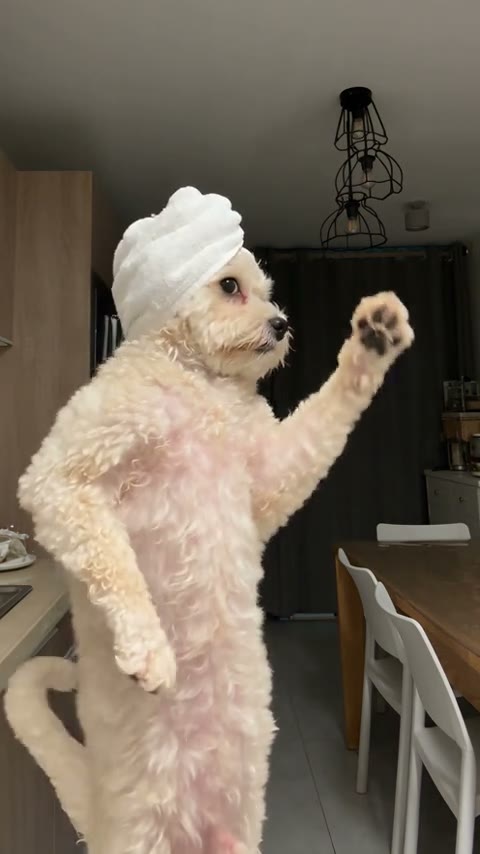
Choose the supplied 29.1-second white-dog performance for your Bad Times AI video, or bring your own source. Recreate opens the workspace with that designated source video and leaves its other settings at their normal defaults: no reference images or prompt are added, and nothing is generated automatically. If you already have a draft, the existing replacement confirmation still applies. The creation panel on this page starts with an editable example prompt.
Watch the whole source before choosing a passage. Use a continuous section that includes a complete gesture and gives the performer room to approach the camera. Generation accepts a 4–30 second MP4 up to 45 MiB. If the original is longer, use Edit clip to prepare a supported passage; keeping the full reference available does not make an overlong upload eligible.

Upload one to eight JPG, PNG or WebP reference images, each up to 8 MiB. For a first attempt, one well-lit image of one character is easier to direct than several conflicting pictures. Show the face and the clothing you want, with arms visible when possible. Additional views should clarify the same identity and outfit. Avoid combining unrelated faces unless your prompt deliberately assigns different roles.
The visual sequence here shows the white dog raising a paw in the kitchen, an AI-created adult character in a teal overshirt, and that character in the same room with a matching raised-hand pose. It explains what each input contributes; the transformed still is an illustration, not a generated Genjutsu video. Select a mode and adapt the example prompt to your actual source and references. If you switch from Motion Transfer to Object Swap, update the wording yourself so the requested change stays clear.

Choose 480p or 720p, check the prepared clip, and request the credit quote. Sign in when prompted, review the inputs and cost, and confirm generation when ready. Signing in, returning from checkout or opening a template does not submit a generation by itself. Processing time varies with the queue and provider; use the status shown in the workspace rather than expecting a fixed completion time.
Watch the result at normal speed, then pause when a hand crosses the face or the performer approaches the camera. Check the face, clothing, hands or paws, the movement’s continuity and the final frame. Listen to the downloaded file as well. If you need the Bad Times song or a different timing, finish that part in your editor and check the complete video before posting.
The clip carries the performance. Use the prompt to explain who replaces the performer, which actions matter and what should remain recognizable. These are starting instructions, not proof that a model will reproduce every gesture or mouth shape. Match the wording to the files you actually select.
Use the source video as the performance reference. Reinterpret the main white dog wearing a towel in the kitchen as the adult character in my reference image. Follow the source’s expressive reactions, raised paws, pointing gestures and approach toward the camera. Interpret the paw gestures as natural human hand gestures. Remove the dog’s fur, tail and towel. Keep the character’s face, short dark hair, teal overshirt and dark trousers recognizable throughout. Preserve the rhythm and direction of the movements, with room for both hands and natural body proportions. Keep the scene coherent and the camera behavior guided by the source. Do not introduce extra performers, captions or unrelated actions.
Replace the appearance details with your own reference. For an animal concept, describe its actual coat and paws, then inspect the result for unwanted human anatomy.
Replace only the white dog wearing a towel in the source video with the adult character in my reference image. Use the reference for the face, hair, clothing and body proportions. Remove the dog’s fur, tail and towel. Interpret its raised-paw pose as a human hand gesture while following its position and expression changes. Retain the surrounding room, objects and camera framing as closely as possible. Pay attention to the hands near the face and the close-up at the end. Keep the intended character distinct, without duplicated limbs, extra people or new text on screen.
This example targets the supplied white-dog clip. Rename the subject when you use a different source. Ask for a focused replacement and inspect both the character and surrounding scene; unchanged scenery is an intention, not a guaranteed result.
The Bad Times routine changes scale: a readable body gesture can become a face filling the frame. Inspect both ends of that movement when choosing a source. A clip with the hands already cut off makes it harder to interpret the gesture. A heavily compressed face gives the model less visual information during the close-up. Favor a clear subject, usable lighting and movement you can follow without guessing what happens behind an obstruction.
Vertical framing often suits the way this trend is shared, but orientation alone does not make a good reference. Keep enough space above the head and around the elbows. Match the reference image’s pose and direction to the source where practical. If an edit has several cuts, choose one continuous passage first. This reduces the number of scene changes you are asking the model to interpret at once.
Use the Bad Times AI previews to compare creative directions, not to judge a guaranteed output quality. A supplied remix may have been made with another tool or edited afterward. The source you select, your reference images, your prompt and the model response all affect the result. For a different kind of movement reference, explore Gas Station Dance AI or the duo performance in Hotel Lobby.
Buy a credit pack once. See the cost before every generation, with the same rates for Motion Transfer and Object Swap.
—
one-timeUSD · one-time payment
One-time credit pack
480Credits
480p · up to 8s total
Up to 8s total at 480p
720p needs at least 520 credits
720p needs at least 520 credits
—
one-timeUSD · one-time payment
One-time credit pack
1,000Credits
480p · up to 16s total
Up to 16s total at 480p
720p · up to 7s total
Or up to 7s total at 720p
—
one-timeUSD · one-time payment
One-time credit pack
1,500Credits
480p · up to 25s total
Up to 25s total at 480p
720p · up to 11s total
Or up to 11s total at 720p
—
one-timeUSD · one-time payment
One-time credit pack
3,300Credits
480p · up to 55s total
Up to 55s total at 480p
720p · up to 25s total
Or up to 25s total at 720p
A 10-second clip uses 600 credits at 480p or 1,300 at 720p.
480p: 60 credits/sec · 720p: 130 credits/sec
Pack allowances are alternative uses of one balance and can cover multiple clips. Each clip must be 4–30 seconds. Combine packs for longer clips or 720p.
Pricing and billing detailsYour selected duration determines the credit quote
Pay for your Bad Times AI video with Genjutsu AI’s one-time credit packs. The current rate is 60 credits per billed second at 480p and 130 at 720p. Prepared duration is rounded up to a whole second. A 10-second clip therefore uses 600 credits at 480p or 1,300 at 720p; a 10.1-second clip is billed as 11 seconds. Choose the passage you need before comparing the quote with your balance.
| Video duration | 480p | 720p |
|---|---|---|
| 4 seconds | 240 credits | 520 credits |
| 5 seconds | 300 credits | 650 credits |
| 10 seconds | 600 credits | 1,300 credits |
The lowest-priced pack includes 480 base credits; its current price appears above. It will not cover every duration and resolution: 480 base credits cover eight billed seconds at 480p. Eligible bonuses, if any, are displayed separately. Check current credit packs and the final quote rather than assuming the whole Bad Times routine costs one fixed price. This page does not promise free generation, an exact completion time or a music license.
In this video trend, Bad Times AI means using generative video tools to reinterpret an expressive, face-to-camera performance associated with Imael Angel’s BAD TIMES. A new person, fictional character or animal takes the performer’s place. On Genjutsu AI, you work with a source clip and character reference images, then choose Motion Transfer or Object Swap.
Some dedicated templates accept one photo because their motion reference is already built in. Genjutsu AI needs a source video as well as one to eight reference images. Choosing an example supplies the video, so you can start by adding a character photo, but the clip remains an essential part of the workflow. Text alone is not the input for these two modes.
Several human performances and AI remixes circulate under this name. On this page, original is the library name of the supplied 29.1-second white-dog-with-a-towel clip that Recreate loads. It is already an AI animal version, not the earliest human post. The other three supplied clips are creative examples. The linked trend sources explain the wider context; they do not establish first-upload attribution for these local files.
To try a Bad Times AI pet video, combine a pet reference with a suitable source and a prompt that describes the intended animal character. Use an image with a clear face, coat pattern and body, and explain the paws and proportions you want. Human-to-animal motion is an interpretation, so inspect upright poses, forelegs and close-ups carefully. The examples do not establish a tested success rate for your pet.
No included soundtrack or exact lip-sync is promised for this workflow. A source with audio does not establish that the final file will preserve that track or match each mouth movement. Listen to the downloaded result and add or adjust suitable audio in your editor if needed. Check the music options and usage terms of the platform where you intend to publish.
Reference images and a focused prompt guide the intended appearance; they do not guarantee perfect identity or an unchanged background. Object Swap is useful for a selected replacement, while Motion Transfer suits a broader reinterpretation. Inspect the result around face-covering hands, turns and the approach toward the lens. Clear references help communicate your intention, but the finished sequence still needs review.
The prepared source must be 4–30 seconds. If the supplied original or your upload is longer, prepare a supported passage with Edit clip before requesting generation. The original file can remain available as a reference; it is not silently shortened for you. Choose a section that completes the action instead of stopping halfway through the gesture.
You can browse examples and prepare your inputs, but generation uses credits. Genjutsu AI charges by the prepared clip’s rounded-up duration and the selected 480p or 720p resolution. Review the quote before confirming. A credit pack is a balance to spend, not a promise that every template or full-length routine fits within that pack.
Only use media you are entitled to use and obtain the required permission for people shown. The account holder must meet the service’s age and content requirements. Seeing baby or celebrity remixes elsewhere does not establish permission or support for a particular request here. Review the content rules and the workspace declarations before uploading; avoid misleading impersonation or humiliating portrayals.

Pick a Bad Times source, add a clear character reference, and direct the performance you want. Start with one understandable change, inspect the result, and finish the sound and timing before sharing your version.
Create my Bad Times video