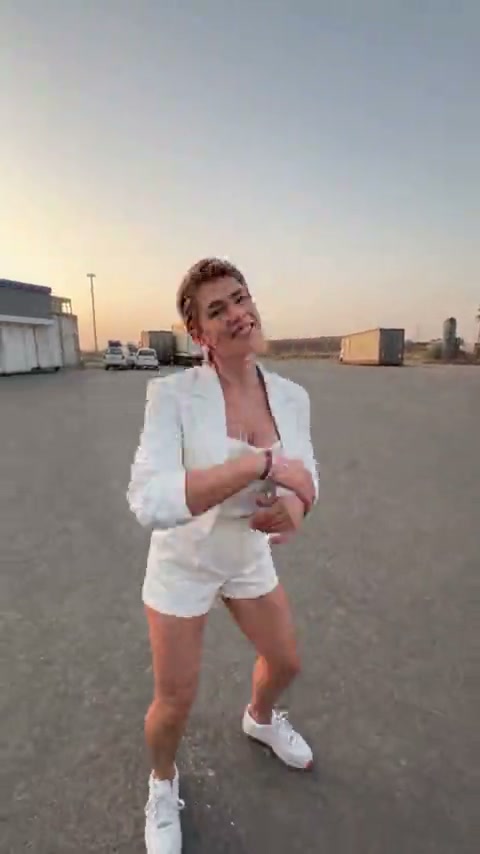
White outfit
Source clip
The dance. The selfie. The entrance. Your cast.
Add a clip to estimate credits
Review the cost before you generate.
Source clip
Source clip
Source clip
Community example
By bouncingmanatee1533Make a Gas Station Dance AI video without planning a shoot on the forecourt. Start with a supplied reference clip, add the characters you want in it, and choose Motion Transfer or Object Swap. The source gives you the dance, camera turns and car-scene timing to work from, so you can get straight to casting your version.
The Gas Station Dance AI trend recasts a short sequence built around three recognisable moments: an opening dance on a forecourt, a close selfie as the camera turns, and a character appearing beside or stepping out of a car. The fun comes from seeing a new crew take those roles while the sequence keeps its familiar momentum. The location alone is not the format; the performers, transitions and entrance work together.
A dedicated photo generator usually supplies its own fixed sequence. Genjutsu AI lets you start with an existing video and reference images, then choose how to reinterpret it. Motion Transfer uses that performance as guidance for a new cast. Object Swap is useful when you want to request a selected replacement, such as changing the opening dancer while keeping the rest of the scene recognisable.
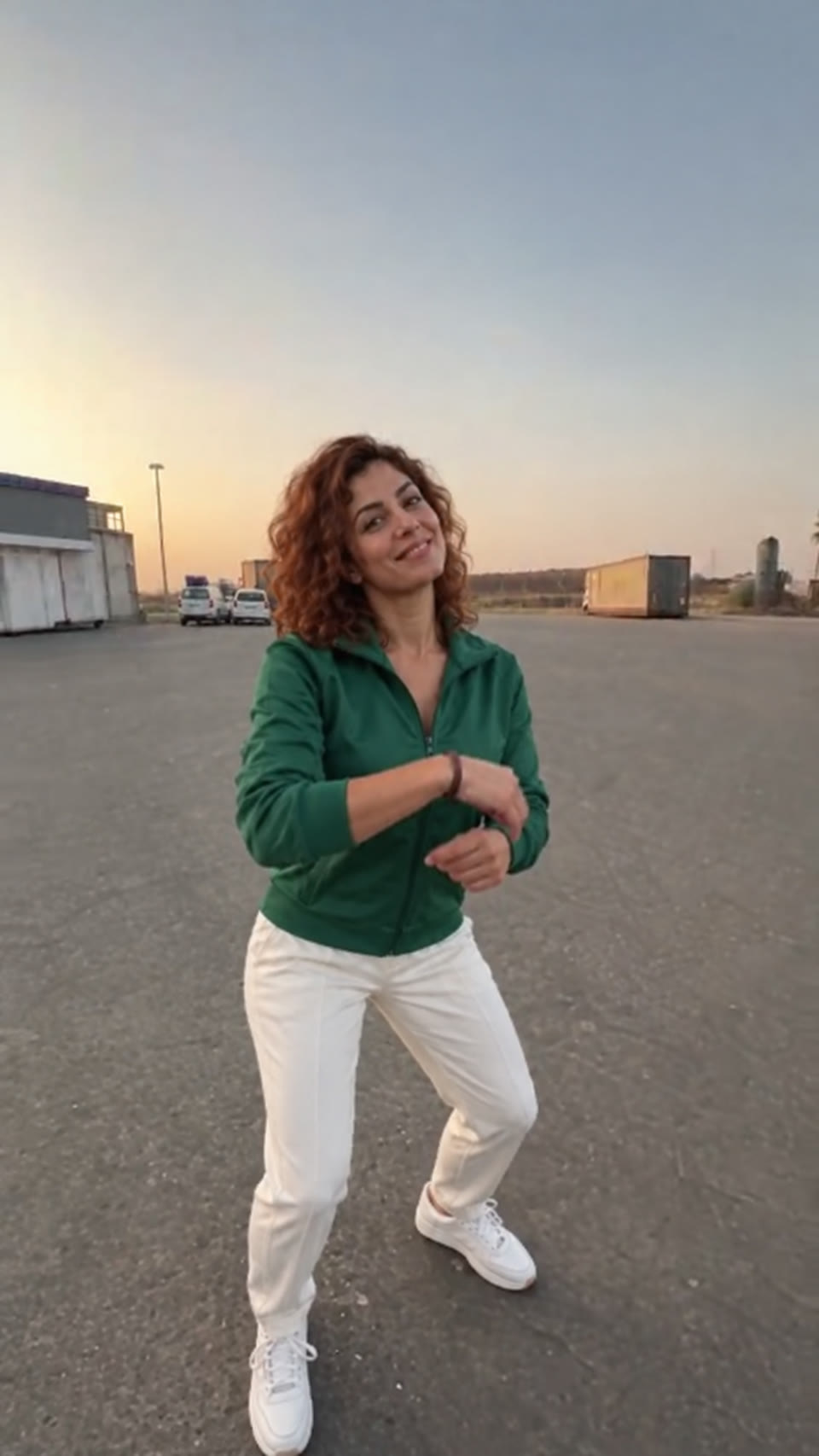
Watch the three supplied references on this page before choosing your direction. They show different casts and outfits within the Gas Station Dance format. These clips are creative source examples, not verified Genjutsu AI generation results. The how-it-works images show a specific character replacement as a static illustration of the editing brief.
Choose Motion Transfer when the dance and camera rhythm are the starting point for your new version. Your source already contains the opening movement, the turn toward the selfie character and the change into the car scene. Add reference images and describe the cast you want. This gives you a quick route to a concrete Gas Station Dance AI brief without scripting every camera movement from scratch.
Name the roles before you describe the mood. Reference 1 can be the opening dancer, reference 2 the selfie person, and reference 3 the person in the car scene. If the selfie person returns at the end of your source, ask for that same reference identity again. The workspace accepts one to eight reference images; the role mapping is a prompt instruction, not a separate identity-lock control.
Keep appearance details distinct. A green jacket for the dancer and a blue shirt for the selfie character are easier to describe than three similar faces in similar clothes. The model still needs to interpret your references across cuts, so check every appearance in the result. Motion, expressions, scenery and camera timing may vary from the source.
Use Object Swap when you want one focused change inside the Gas Station Dance scene. For example, replace the opening dancer in white with the original character in an emerald jacket shown below. Describe that person by outfit and action so the model has a clear target. Ask for the rest of the forecourt and the other performers to stay consistent.
For a first Gas Station Dance AI test, select the passage that contains the target you care about. A short dance segment makes it easier to judge posture, clothing and facial similarity before asking for a replacement across the full edit. If the same person appears in another shot, explicitly connect those appearances in the prompt.
Object Swap is a selected edit, but it can still affect nearby details. Inspect feet against the asphalt, hands passing across the body, reflections and the outline of a car door. When the target is partly hidden or blurred by a camera turn, a result may need another attempt. Review the delivered video rather than judging success from one attractive opening frame.
| What you want to change | Reference plan | Suggested mode |
|---|---|---|
| A new cast across the dance, selfie and car scenes | One clear image per role, plus the source sequence | Motion Transfer |
| Only the opening dancer or one later performer | One replacement image and a precise target description | Object Swap |
| The song or a beat-aligned final edit | Inspect the result, then use your editor or posting app | Finish audio after the visual transformation |
Source video frame AI-generated character reference Illustrative recast · AI-generated still
The tool at the top of this page starts with a source clip and an applied, editable Motion Transfer prompt at 480p. Add your own reference images. Use the video control to choose a supplied clip or your own footage. The full clip stays selected until you use Edit clip to change its duration or framing; you can prepare these inputs before signing in. Recreate and the final “Create my Gas Station Dance video” button open the full workspace.
Watch where each person appears and where the camera cuts. Keep the complete sequence if the reveal matters to your idea, or use Edit clip to choose a shorter 4–30 second test. Avoid ending a selection halfway through a camera turn if you want a clear final frame.
Upload one to eight clear images. For a full Gas Station Dance AI recast, a separate image for the dancer, selfie character and car-scene performer makes your intention easier to explain. For one replacement, start with that person's reference and switch to Object Swap. A face-and-outfit view is useful for the dancer; a clear portrait matters for the selfie close-up.
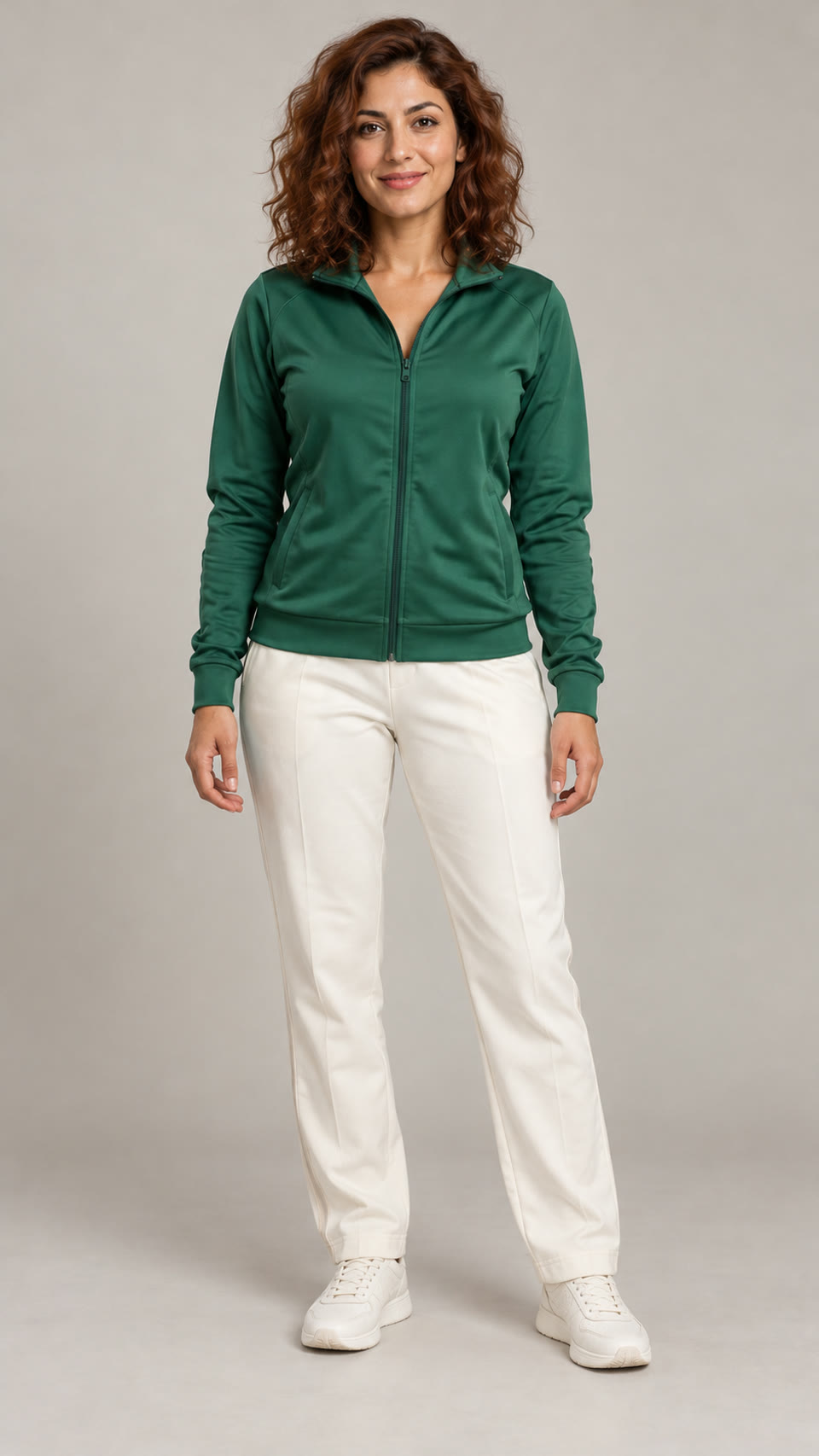
Review the three role assignments in the applied prompt. If you add fewer than three reference images, remove or rewrite the unused assignments. Do not assume upload order alone creates a fixed casting rule. State whether any role appears again at the end, and keep its reference identity consistent. The studio portrait below is an original AI-generated adult character you can use to understand what a clear reference looks like.
Choose 480p or 720p, then Generate. Sign in if prompted to get the confirmed quote for your prepared clip. Check the inputs and credits, add credits if needed, then choose Confirm & generate when ready. Signing in or paying does not start generation. The actual prepared duration is rounded up to a whole second. A clip displayed as roughly 15 seconds may be slightly longer and bill as 16; the confirmed quote is the place to check, rather than estimating from a rounded preview label.
When your Gas Station Dance AI video is ready, watch the dance, selfie, car reveal and any return shot. Compare faces and clothing across those moments, then check foot placement, hands and the moving camera. Download the version you want to keep and review the soundtrack before adding captions or posting.
Visual walkthrough: one source frame, a new character reference and an AI-generated edit of that frame. The final image illustrates the intended change; it is not a generated video result.
The Motion Transfer example below is already applied in the tool at the top. Edit it to match your images. Switching to Object Swap keeps your current text, so replace or adapt the prompt for that mode. Use the source to decide what belongs in the prompt. These examples describe an intended transformation; they have not been tested as guaranteed recipes. Keep the role names and outfits accurate, and avoid adding an extra scene that your selected source does not contain.
Recast the adult performers in this source video using my reference images. Reference 1 is the opening dancer on the forecourt. Reference 2 is the selfie performer; use that same identity if the selfie returns at the end. Reference 3 is the person in the car scene. Follow the source dance, camera turns, scene order and performance timing. Keep the three faces, hairstyles and outfits distinct across the selected shots. Retain the forecourt and warm evening atmosphere. Avoid additional people, blended identities and new cuts.
You can use one person in several roles if that is your intention, but say so explicitly. For a group version, write a simple role-to-reference list before generating.
Replace only the adult opening dancer wearing white with the adult woman in my reference image. Use her auburn curls, emerald green track jacket, ivory trousers and ivory trainers. Match the source dance pose, body scale, facial direction and evening light. Keep the camera framing, forecourt, parked vehicles and other performers as consistent with the source as possible. Follow this replacement only where the opening dancer appears in the selected clip.
This matches the illustrated Gas Station Dance AI change. Rewrite the target if you choose the red-jersey or dark-jacket source, and inspect the other roles for unintended changes.

A Gas Station Dance AI video moves between different kinds of framing. The opening needs space for feet and hands; the selfie relies on a clear face; the car scene needs room for the door and the person's entrance. Check all three before cropping. A frame that flatters the close-up may cut off the dance, while a very wide composition can make the selfie hard to read.
The supplied Gas Station Dance sources are already vertical. Keep that composition when it serves the sequence, and add captions where they do not cover faces or the dancer's feet. For another source, preview your crop throughout the selected passage. Object Swap requires at least 409,600 pixels per prepared frame: these 480 × 854 originals are only just above that threshold, so an aggressive crop can make them too small.
The source also gives you a reference for the rhythm, but original audio and exact beat alignment are not guaranteed in the generated file. Listen to the download. Use an editor or the destination app to add a track you are entitled to use and align the car reveal if necessary. Higher resolution changes the quoted output setting; it is not a promise of perfect timing or identity.
Buy a credit pack once. See the cost before every generation, with the same rates for Motion Transfer and Object Swap.
—
one-timeUSD · one-time payment
One-time credit pack
480Credits
480p · up to 8s total
Up to 8s total at 480p
720p needs at least 520 credits
720p needs at least 520 credits
—
one-timeUSD · one-time payment
One-time credit pack
1,000Credits
480p · up to 16s total
Up to 16s total at 480p
720p · up to 7s total
Or up to 7s total at 720p
—
one-timeUSD · one-time payment
One-time credit pack
1,500Credits
480p · up to 25s total
Up to 25s total at 480p
720p · up to 11s total
Or up to 11s total at 720p
—
one-timeUSD · one-time payment
One-time credit pack
3,300Credits
480p · up to 55s total
Up to 55s total at 480p
720p · up to 25s total
Or up to 25s total at 720p
A 10-second clip uses 600 credits at 480p or 1,300 at 720p.
480p: 60 credits/sec · 720p: 130 credits/sec
Pack allowances are alternative uses of one balance and can cover multiple clips. Each clip must be 4–30 seconds. Combine packs for longer clips or 720p.
Pricing and billing detailsSame workspace rates. No separate trend subscription.
A Gas Station Dance AI video costs 60 credits per billed second at 480p or 130 at 720p. The prepared clip duration rounds up to the next whole second. A 4.2-second selection is five billed seconds. Review the quote after choosing your final trim and resolution.
| Video duration | 480p | 720p |
|---|---|---|
| 4 seconds | 240 credits | 520 credits |
| 5 seconds | 300 credits | 650 credits |
| 10 seconds | 600 credits | 1,300 credits |
| 16 seconds | 960 credits | 2,080 credits |
Coverage below uses base credits; any eligible first-purchase bonus is shown separately. Check your balance against the confirmed quote. The supplied source is slightly longer than 15 seconds, so the complete clip rounds to 16 billed seconds: 960 credits at 480p or 2,080 at 720p. The lowest-priced pack is — for 480 credits; use a shorter 480p selection for a smaller first test. It does not cover the minimum four-second 720p generation. See current credit packs before confirming. A completed new take is a new generation.
Choose according to how you want to start. A dedicated photo template supplies its own sequence and casting rules. Genjutsu AI is useful when an existing clip is your creative reference and you want Motion Transfer or a selected Object Swap. Compare the required inputs, roles, output settings, audio promises and actual cost.
Yes. You can start with one of the supplied source clips and add character references. You still need a video source for this workflow, but you do not need to film a new dance or visit a gas station. Choose material and reference photos you have permission to use.
No. Genjutsu AI accepts one to eight reference images. Three separate photos are a useful plan when you want three distinct roles: dancer, selfie person and car-scene performer. One clear reference can be enough to describe a single replacement. The number of files should match the change you intend to request.
You can request that with Object Swap. Identify the opening dancer by outfit and action, supply the replacement image, and ask the model to retain the other people. Check the complete output, including shared hands, background details and any shot where the target reappears.
Assign that role one clear reference and explicitly say the same character returns in the final selfie if your source includes it. Keep facial features and clothing consistent in the brief. Upload order does not provide a guaranteed identity lock, so compare every close-up before choosing the final video.
Do not assume it will. Original sound, precise beat alignment and lip sync are not guaranteed by these workflows. Listen to the generated file and add or align a suitable track in your editor or posting app if needed. Generating the visuals does not grant rights to a particular recording.
The quote uses the actual prepared duration rounded up, while a preview label may show a rounded number. A source lasting 15.02 seconds bills as 16 seconds. Trim to the passage you need and inspect the confirmed quote before generating; do not calculate cost from a short display label alone.
The three videos are supplied trend references. The character portrait and edited result frame are AI-generated stills used to illustrate the requested change. They are not verified Gas Station Dance AI outputs from Genjutsu AI. The separate linked video case study documents a different example.

Pick the dancer, the selfie character and the person making the entrance. Start with the prepared source, add your references and choose the mode that fits your idea. Review your credit quote and give the familiar sequence a new cast.
Create my Gas Station Dance video