original
Trend reference
Your character in the freestyle. Your clip sets the movement.
Add a clip to estimate credits
Review the cost before you generate.
Trend reference
Trend reference
Trend reference
Trend reference
Make a Bulin 47 AI video with Genjutsu AI using a source performance and your character images. Follow the street-freestyle movement with Motion Transfer or request a focused replacement with Object Swap. Choose a short passage, identify the lead, and keep the speaker holder and crowd in mind as you direct your version. You review the prepared inputs and credit quote before generation.
The Bulin 47 AI video trend gives a street-freestyle performance a new lead. The reference features Dominican artist Bulin 47 with Kevin Wai and a portable speaker, surrounded by people watching the exchange. AI remixes place another person or character into the performance. The shoulder movement, gestures, nearby speaker, and reacting crowd make the scene recognizable.
You can view Kevin Wai’s freestyle post for the source context. The performance is also associated with the phrase “Dame Hombro” and a later song release by Bulin 47 and Kevin Wai. Those names help distinguish this particular scene from a general rap animation or another Bulin 47 music video.
For a creator, the useful question is which part of the scene should change. You may want to put yourself in the lead, introduce an original fictional performer, or experiment with the entire visual style. Genjutsu AI uses the existing clip to guide action and reference images to describe appearance. The provided remixes demonstrate creative directions; they are not presented as tested outputs from this website.
Use Motion Transfer when the rhythm and body language are central to your idea. An original character can take on the source’s shoulder movement and gestures while retaining the look described by your image. Choose a reference that shows the head, torso, and clothing clearly enough to explain the intended performer.
Assign the lead explicitly. In the supplied performance, the rapper wears sunglasses and an open light-pink shirt behind the person holding the speaker. Those details identify the role you are changing; they do not mean the replacement must inherit that wardrobe. Explain whether the new character should wear the outfit in your reference or a separately described look.
The source guides the performance, but timing and appearance can vary. Watch the lead’s face when they turn, and check whether the same character returns after someone moves in front. If several reference images suggest different outfits or facial features, simplify the set so that your instructions describe one coherent result.
Use Object Swap when you want to change one clearly identified subject within the street scene. Tell it which performer to replace and which people should keep their existing roles. The person holding the speaker is an important separate subject. Describing everyone as the rapper makes the assignment ambiguous.
A useful first request replaces the lead while retaining the speaker holder, bystanders, and overall setting. Supply one clear character image and identify the target by clothing, position, and action. If you only want to change a prop or outfit, write that narrower request instead of also asking for a complete recast.
Object Swap still needs review. It can alter surrounding details, and a person crossing the frame can confuse the target. Inspect the speaker edge, nearby hands, clothing, and faces during overlaps. Keeping the background recognizable is an editing goal, not a promise that every bystander remains identical in every frame.
| What you want to change | Suggested mode | How to direct it |
|---|---|---|
| The lead’s appearance or the performance’s visual style | Motion Transfer | Use the freestyle as movement guidance and describe a coherent character |
| One selected person, outfit, or prop in the street scene | Object Swap | Identify the target and distinguish it from the speaker holder and crowd |
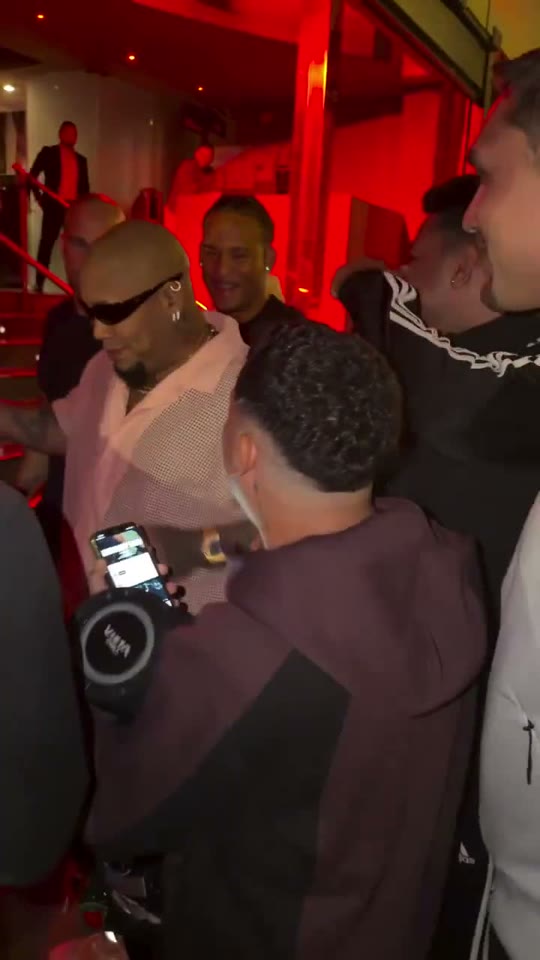
The creation panel loads the supplied original performance with an editable Motion Transfer prompt at 480p. The full source is 46.39 seconds long, so open Edit clip and explicitly choose a 4–30 second passage before generation. The original is kept intact; the page does not silently choose or remove a section for you.
Every Recreate card opens the workspace with this same original, including cards that preview an AI remix. Recreate adds the source only, leaves the normal workspace defaults in place, and does not submit a job. Confirm any replacement of an existing draft. Start with a short passage where the lead’s face and shoulders remain visible and the intended gesture has a clear beginning and end.
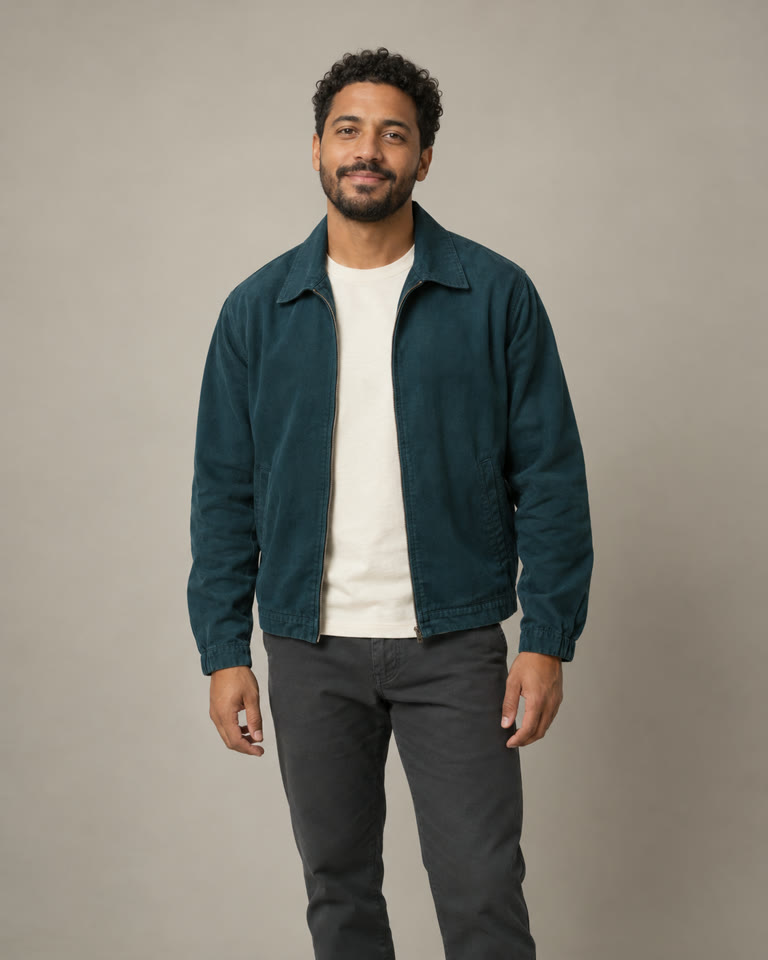
Prepare one to eight reference images in JPG, PNG, or WebP, up to 8 MiB each. For one lead replacement, begin with a clear image of one person or original character. A waist-up view can show the face and outfit together. Avoid a group photo when you need an unambiguous identity assignment.
Choose Motion Transfer for a broader interpretation or Object Swap for a selected target. Edit the prompt to match your choice; changing modes keeps the current text. The illustrated sequence below connects a frame of the source with an AI character image and an illustrative transformed frame. It explains the creative brief without claiming that the images prove a completed video result.
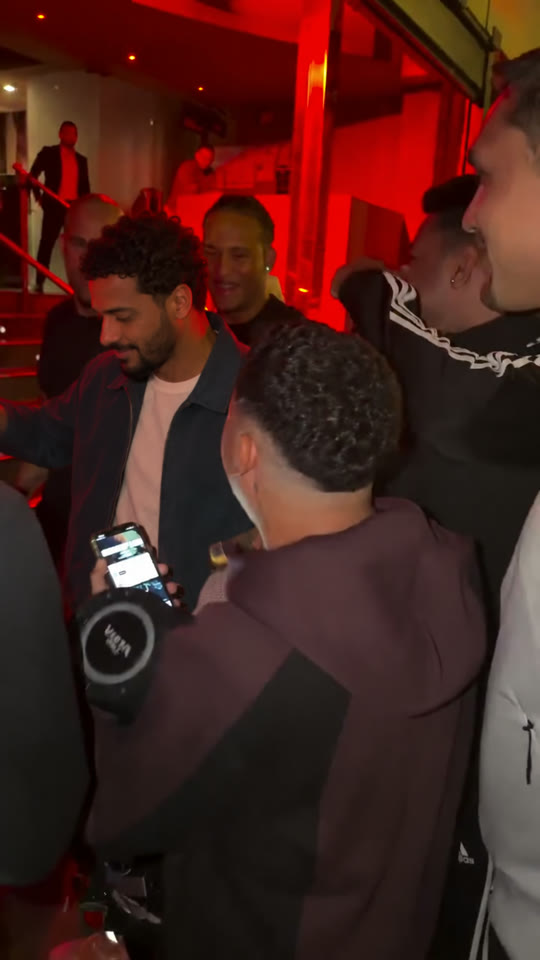
Check your selected duration and framing, choose 480p or 720p, and request the credit quote. Sign in if prompted, then review the inputs and confirm generation when ready. Adding credits does not start a job automatically. Keep the source selection consistent while reviewing the quote; changing the prepared clip changes the work being requested.
Once a result is available, watch the whole freestyle passage with sound. Inspect the lead, the speaker holder, and the crowd separately. Then pause around turns and moments when hands cross the lead’s face. Download the version you want to keep and align suitable audio separately if needed. Queue and provider conditions affect processing time, so this page does not promise an exact turnaround.
The Motion Transfer example is applied in the creation panel. Both prompts below were written as starting points for the supplied scene, not as guarantees of tested performance. Replace the character description with details that match your image, and remove instructions that conflict with the selected passage. The prompt limit is 10,000 characters; precision comes from clear role assignments rather than using all of that space.
Reimagine the lead performer in the selected freestyle passage as the original adult character in my reference image. The lead is the person in sunglasses and an open pale-pink shirt, behind the speaker holder. Use my image for the new performer’s face, hairstyle, proportions, and clothing. Let the video guide the shoulder rhythm, arm gestures, turns, and camera pace. Keep the person carrying the speaker and the spectators visually distinct from the new lead. Maintain one recognizable character design through the whole passage, including moments when other people partly obscure the performer.
The pink shirt identifies the source performer. If your character should wear another outfit, make that choice clear in the reference and prompt. A consistent character image is more useful than adding several competing costume ideas.
Replace only the freestyle lead wearing sunglasses and an open light-pink shirt with the person in my reference image. Keep the speaker holder as a separate person in the foreground. Use the target’s existing position, body movement, and scale for the replacement. Preserve the street setting, crowd arrangement, and portable speaker as closely as possible. Keep the replacement’s face and clothing coherent as the body turns and hands cross the frame. Do not assign the reference identity to the speaker holder or to spectators.
Review the whole source passage to confirm those identifying details still apply. If you use your own freestyle clip, rewrite the role description around the actual people and positions in that footage.
The supplied performance is vertical, but the lead is not the only important part of the composition. Leave room for the speaker, the nearby person carrying it, and the lead’s moving hands. A tighter crop can remove the context that makes the freestyle recognizable or hide the clues used to identify the target.
For your own uploads, use an MP4 up to 45 MiB and a prepared duration of 4–30 seconds. Object Swap requires at least 409,600 pixels in each prepared frame. Check the dimensions after cropping, because a large original file can still produce a crop below the minimum. The output choices are 480p and 720p; they do not repair details that were already unclear in the source.
Choose a passage by its action, not only its length. A clean shoulder gesture with the face visible is easier to assess than a section dominated by a bystander’s back. Keep the original recording available while you review the result so that you can compare which movements and role changes came from the source.
Buy a credit pack once. See the cost before every generation, with the same rates for Motion Transfer and Object Swap.
—
one-timeUSD · one-time payment
One-time credit pack
480Credits
480p · up to 8s total
Up to 8s total at 480p
720p needs at least 520 credits
720p needs at least 520 credits
—
one-timeUSD · one-time payment
One-time credit pack
1,000Credits
480p · up to 16s total
Up to 16s total at 480p
720p · up to 7s total
Or up to 7s total at 720p
—
one-timeUSD · one-time payment
One-time credit pack
1,500Credits
480p · up to 25s total
Up to 25s total at 480p
720p · up to 11s total
Or up to 11s total at 720p
—
one-timeUSD · one-time payment
One-time credit pack
3,300Credits
480p · up to 55s total
Up to 55s total at 480p
720p · up to 25s total
Or up to 25s total at 720p
A 10-second clip uses 600 credits at 480p or 1,300 at 720p.
480p: 60 credits/sec · 720p: 130 credits/sec
Pack allowances are alternative uses of one balance and can cover multiple clips. Each clip must be 4–30 seconds. Combine packs for longer clips or 720p.
Pricing and billing detailsThe quote follows the passage you prepare
Genjutsu AI sells one-time credit packs. A generated video costs 60 credits per billed second at 480p or 130 at 720p. The selected duration rounds up to the next whole second. Trim the original before requesting the quote so that the cost matches the passage you intend to create.
| Video duration | 480p | 720p |
|---|---|---|
| 4 seconds | 240 credits | 520 credits |
| 5 seconds | 300 credits | 650 credits |
| 10 seconds | 600 credits | 1,300 credits |
The lowest-priced pack currently shows — for 480 credits. Compare your balance with the confirmed quote for the chosen length and resolution. Any eligible bonus appears separately from the base credits used in the coverage estimate. See current credit packs for available currency and offers. A shorter first attempt lets you evaluate the character and role assignment before committing credits to a longer performance.
The reference is a street performance featuring Bulin 47 and Kevin Wai in Spain. Kevin Wai’s original post is linked above. The scene became associated with the phrase Dame Hombro and inspired AI character remixes. The source performance, later music release, and AI edits are related materials with different purposes.
The supplied original lasts 46.39 seconds, while Genjutsu AI accepts prepared videos from 4 to 30 seconds. Load the full recording and use Edit clip to choose the passage yourself. It remains the original source in the library; your selection prepares only the part you want to generate.
One clear reference image can describe one replacement character, but this workflow also needs a source video. The supplied original can provide that performance after you choose a supported passage. A photograph alone does not contain the shoulder movement, timing, camera motion, or crowd interaction.
It opens the workspace with this topic’s original source performance. It does not use the previewed remix as the source, fill in your reference image or prompt, or start generation. The workspace keeps its normal defaults, and an existing draft still requires the usual replacement confirmation.
You can request that they stay consistent, particularly with Object Swap, but unchanged background people are not guaranteed. Identify the lead separately from the speaker holder and inspect both throughout the result. Try a clearer, shorter passage if the replacement identity spreads to another person.
Original sound and exact lip sync are not guaranteed by this workflow. Check the output file and use suitable audio in your editor or publishing platform if needed. There is no separate voice-cloning control here, and a generation purchase does not provide a music license.
Genjutsuai.io is an independent video product, not an official Bulin 47 or Kevin Wai app. It provides Motion Transfer and Object Swap through the Higgsfield Genjutsu API. The input limits, credit packs, and controls on this website apply to your session here.
Try the Burning Bridges AI video generator, which uses a supplied party performance as its motion reference, or the Hotel Lobby AI video trend for a two-person studio scene. Choose each source for the movement you actually want to follow.

Load the original, choose your 4–30 second moment, and add a clear character image. Direct the performer’s role, check the quote, and review the full result before sharing your version.
Create my Bulin 47 AI video