Genjutsu AI로 5초짜리 홈페이지 영상을 만든 과정
홈페이지 영상은 같은 댄서의 흑백 버전과 네온 3D 버전을 비교합니다. 실제 생성 파일을 바탕으로 참고 이미지, 편집 방식, 모델 결과를 보정해야 했던 지점을 정리했습니다.
Genjutsu AI 제작 기록 · 운영자: YUAN JUN
테스트: 2026년 10월 6일 · 게시: 2026년 10월 7일
사용한 자료와 설정
- 인물 변환 입력
- 10초 · 960 × 720 · 30 fps · 4:3
- 인물 참고 이미지
- 안경을 쓴 같은 댄서의 다섯 가지 시점을 한 장에 구성
- 모델
- Higgsfield Genjutsu Motion Transfer v1.0
- 스타일 변환 입력
- 인물 변환 원본의 첫 5초 · 720p 요청
- 스타일 프리셋
- Neon Graphic Cinematic 3D
- 웹용 최종 파일
- 1280 × 720 · H.264 MP4 · 24 fps · 5초
내 영상으로 캐릭터 변환 준비하기
이 사례는 두 번의 생성과 로컬 편집을 거쳤습니다. 현재 작업 공간에서는 첫 번째 캐릭터 변환 단계를 준비할 수 있습니다.
- 본인 MP4의 선명한 4–5초 구간과 일관된 캐릭터 참고 이미지로 시작하세요.
- 아래 캐릭터 프롬프트를 수정해 누가 바뀌는지, 어떤 참고 이미지를 쓰는지, 무엇을 유지할지 적으세요.
- 480p 또는 720p를 선택하고 크레딧 견적을 확인한 뒤 생성하세요. 다른 버전을 만들기 전에 전체 결과를 비교하세요.
Motion Transfer 모드로 작업 공간을 엽니다. 내 영상과 참고 이미지를 추가하고 수정한 프롬프트를 붙여 넣으세요.
캐릭터 변환 예상 크레딧
| 준비한 원본 클립 | 480p | 720p |
|---|---|---|
| 5초 | 300크레딧 | 650크레딧 |
| 10초 | 600크레딧 | 1,300크레딧 |
현재 작업 공간의 생성 1회 기준 요금입니다. 원본 길이는 정수 초로 올림합니다. 이 제작의 과거 청구 내역이 아니며, 별도 Restyle 단계와 로컬 편집은 포함하지 않습니다.
기본 480크레딧 패키지는 —부터 시작합니다. 적용 가능한 첫 구매 혜택은 결제 과정에서 표시됩니다. 견적과 사용 가능 잔액을 비교하세요. 가격
결과에서 확인할 사항
- 컷마다 비교하세요. 인물, 인물 수, 의상, 안경이 달라질 수 있습니다.
- 배경 인물까지 포함해 손, 발, 소품과의 접촉을 전체 크기로 확인하세요.
- 정렬이나 크롭 전에 실제 길이와 프레임 속도를 확인하고 원본 출력을 보관하세요.
캐릭터 변환에는 Motion Transfer를 선택하세요. 네온 버전은 별도 Restyle API 프리셋을 사용했고, 분할선·타이밍 정렬·크롭은 이후 편집했습니다. 작업 공간에서는 Restyle과 최종 합성을 제공하지 않습니다.
실제로 제출한 프롬프트
두 생성 요청에 사용한 영어 원문입니다. 보존 지시는 의도한 결과를 나타내며, 실제 출력에는 아래에 기록한 수정이 필요했습니다.
캐릭터 · Motion Transfer · 10초 · 720p
영어 원본 프롬프트
Replace every visible instance of the original lead male performer in the source video with the SAME fictional adult woman shown in the reference image. This applies to all foreground and background duplicates, and to partially visible heads, bodies, hands and feet. Preserve the number, position, relative size, depth and occlusion of the source performer's duplicates in each shot.

The reference is a multi-view sheet of ONE woman, not several different characters. Use it as the single source of her identity, hairstyle, clothing and eyewear. Maintain her facial features, short silver-platinum pixie haircut with darker cropped sides, athletic proportions, tailored black tuxedo, white dress shirt, black bow tie, white pocket square, black trousers and plain polished black shoes across all shots. Replace the original footwear with her reference shoes in foot-only close-ups while retaining the source footwork and contact with the floor.

EVERY instance of this woman wears the SAME plain black acetate glasses with clear untinted lenses FOR THE ENTIRE VIDEO, including shots where the original performer has no glasses. This is a permanent part of her appearance, not an accessory change. No putting on, removing, switching or morphing glasses. Keep the eyes visible through the lenses, with natural fit and subtle reflections. Do not add any brand markings or decorative logos to the frames.

Follow the original hand and head movement during the glasses-adjustment gesture. Maintain realistic hand-to-frame contact and finger occlusion. When a head is cropped or leaves the frame, allow the glasses to disappear naturally with that head; do not invent a removal action, show floating glasses or reposition the subject to keep the glasses in view.

Follow the source choreography, poses, gestures, footwork, expression timing, shot sequence, cuts, camera movement, framing, perspective and pacing. Preserve the white studio background, chair and existing scene elements. Retain the source composition and intentional cuts at the frame edges. Do not zoom out, invent scenery or change the editing rhythm.

Maintain a neutral BLACK-AND-WHITE image, matching the source lighting and contrast, with realistic anatomy, natural skin, fabric and movement. Keep the same fictional female identity in every shot without reverting to the original male performer's face or hairstyle. Use the reference only for appearance, never reproduce its contact-sheet panels, static poses, dividers or borders. No colored elements, tint, text, captions, watermarks, extra people or new props other than the specified permanent glasses.
스타일 · Restyle API · 5초 · 720p · 프리셋 별도 선택
영어 원본 프롬프트
Restyle the existing subjects and scene in this video using the selected Neon Graphic Cinematic 3D preset. This is a visual style conversion of the SAME already-established fictional adult woman, not another character replacement.

Preserve the woman's recognizable facial identity, short silver-platinum pixie hairstyle, plain black acetate glasses with clear lenses, tailored tuxedo, white shirt, black bow tie, pocket square, trousers and black shoes. Every visible foreground and background duplicate is the same woman. Keep her glasses on throughout. Let the selected preset determine the graphic 3D rendering, stylized materials, neon color accents and cinematic lighting; do not force the output to remain monochrome.

Preserve the source choreography, gestures, facial expression timing, footwork, hand motion, camera movement, shot order, cuts, framing and perspective. Keep the same number, relative sizes, locations and occlusions of all duplicates. Keep the studio's existing spatial layout and chair; do not replace the scene with a different location or add new props, architecture or performers. Retain the existing camera framing, including intentionally cropped bodies at the frame edges.

Keep movement and shot transitions closely aligned to the input, so the result can be compared with it using a moving vertical split-screen reveal. Do not render a split screen, wipe, divider, frame border, labels, contact sheet, subtitles, logo or watermark in the generated video; those will be added separately in editing. Produce one continuous restyled version of the supplied clip, with no new intro, outro, freeze frame or additional scene.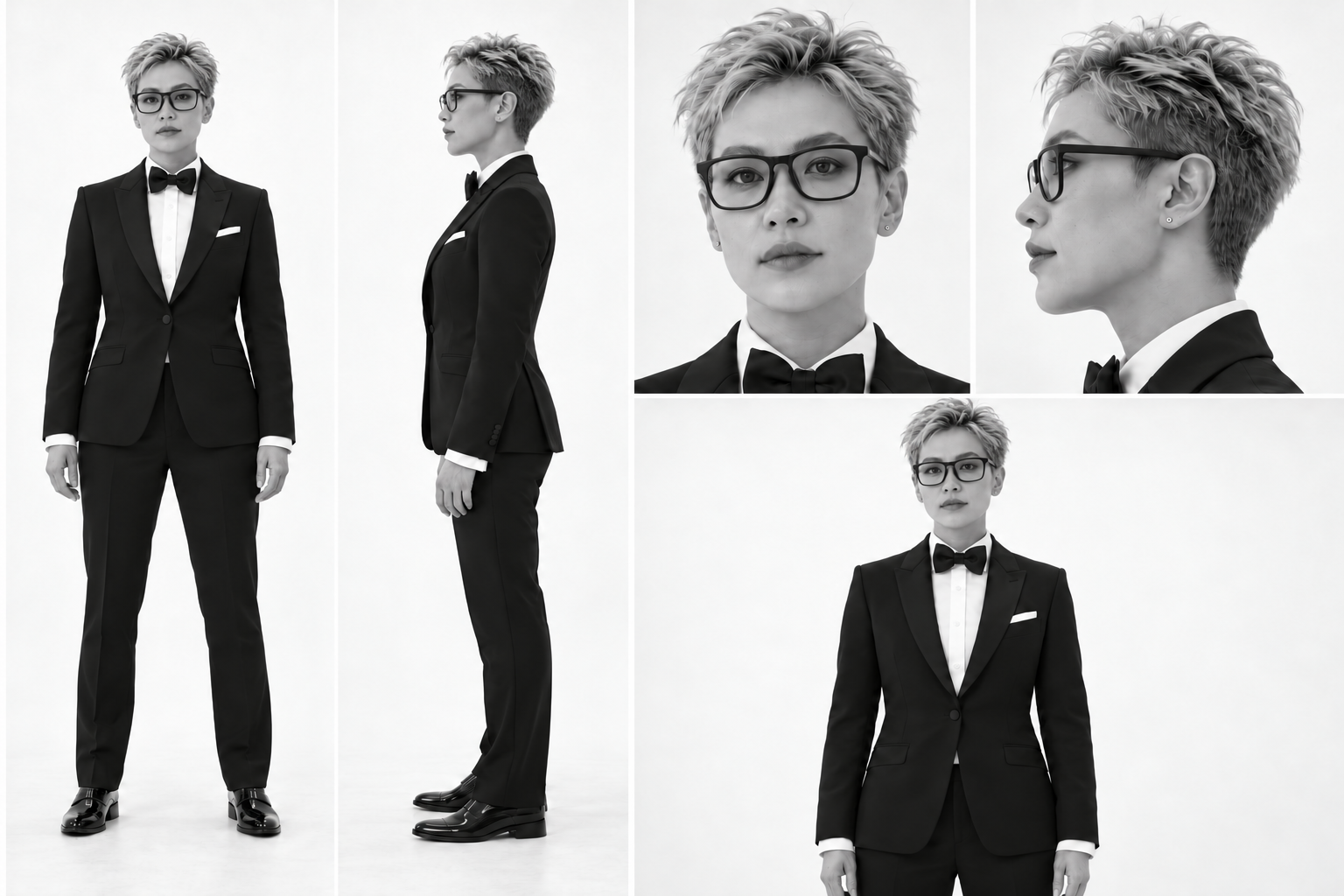
분할 화면으로 합치기 전의 두 버전
캐릭터의 외형부터 일관되게 정하기
첫 생성에서는 10초짜리 4:3 퍼포먼스 영상을 동작과 구도의 기준으로 사용했습니다. 가상의 여성 댄서를 정면, 측면, 얼굴과 의상 가까운 시점으로 보여 주는 참고 이미지를 준비했습니다. 전경과 작은 배경 인물 모두 같은 얼굴, 머리, 정장, 검은 테 안경을 유지하도록 요청했습니다. 원본 퍼포먼스 영상은 별도의 입력 자료이며, 당사가 직접 촬영했다고 주장하는 사례가 아닙니다.
원본에는 일부 장면에서만 안경이 보였습니다. 새 캐릭터는 처음부터 끝까지 안경을 쓰도록 통일해 등장 시점을 둘러싼 지시 충돌을 줄였습니다. 끝부분의 안경을 만지는 손동작도 확인 대상이 됐습니다. 참고 이미지가 일관성을 돕더라도 작은 얼굴이나 빠른 손동작까지 정확히 재현되었다는 뜻은 아닙니다.
웹용 압축본 대신 생성 원본으로 스타일 변환
두 번째 생성에는 웹사이트용 미리보기 대신 인물 변환 원본의 첫 5초를 사용했습니다. 입력은 1112 × 834, 24 fps, 120프레임이었습니다. Genjutsu Restyle API에서 실제 Neon Graphic Cinematic 3D 프리셋을 선택하고 720p를 요청했습니다. 인물은 영상에 이미 있었으므로 새 캐릭터 이미지는 추가하지 않았습니다.
반환된 영상 트랙은 4.6875초, 16 fps, 75프레임이었습니다. 첫 인물 변환도 10초 입력에 약 9.71초를 반환했습니다. 입력과 출력의 길이나 프레임 수가 같지 않았기에, 비교 영상을 만들기 전에 실제 파일을 확인했습니다. 정확한 길이와 프레임 단위 동작 보존을 보장하지 않는 이유이기도 합니다.
전체 속도보다 컷 경계를 먼저 맞추기
영상 전체의 속도를 한 번에 바꾸는 것만으로는 컷이 모두 맞지 않았습니다. 군무 장면은 흑백 원본의 1.125초, 네온 결과의 1.0625초에서 시작했고, 얼굴 클로즈업은 각각 4.0833초와 3.8125초에서 시작했습니다. 대응하는 컷 경계를 먼저 고정한 뒤 각 장면 안에서 프레임 순서를 유지하며 맞췄습니다.
네온 원본의 75프레임을 원래 순서대로 120프레임 타임라인에 배치했습니다. 역재생이나 광학 흐름으로 새 프레임을 만들지는 않았고, 일부 프레임을 반복했습니다. 최종 파일이 24 fps라는 것은 공통 타임라인을 사용한다는 뜻이며, 네온 영상에 매초 서로 다른 동작 프레임 24장이 생긴 것은 아닙니다. 흑백 영상의 타이밍은 바꾸지 않았습니다.
두 버전에 같은 화면 자르기 적용
4:3 구도를 넓은 홈페이지에 맞추기 위해 두 영상에 같은 중앙 16:9 크롭을 적용했습니다. 위아래에서 원래 높이의 약 12.5%씩 잘라내고 1280 × 720으로 내보냈습니다. 인물 비율은 유지되지만 일부 화면은 사라집니다. 확대도 포함되므로 720p 파일이라는 사실이 새로운 실제 디테일을 뜻하지는 않습니다.
좁은 화면에서는 웹사이트의 cover 배치 때문에 데스크톱보다 더 많은 부분이 가려질 수 있습니다. 제목과 버튼은 영상에 넣지 않고 웹페이지 요소로 배치해 화면 크기가 달라도 읽고 누를 수 있도록 했습니다.
왕복 분할 효과를 하나의 영상으로 합성
0~0.25초는 흑백 전체 화면입니다. 0.25~2.25초에는 분할선이 왼쪽에서 오른쪽으로 이동하며 네온을 드러냅니다. 2.50초까지 네온을 유지한 뒤, 4.50초까지 선이 되돌아와 흑백을 복원합니다. 마지막 0.5초는 다시 흑백입니다. 두 영상의 동작은 전 구간 앞으로 재생됩니다.
완성본은 두 웹 플레이어를 동기화하는 방식이 아니라 하나의 5초 MP4입니다. 분할선 위치는 처음으로 돌아오지만 원본 동작의 끝과 시작에는 컷이 있습니다. 따라서 끊김 없는 퍼포먼스가 아니라 반복 재생되는 비교 영상입니다. 홈페이지에는 일시 정지 버튼이 있고 동작 줄이기 설정을 반영합니다.
이 테스트로 확인한 것과 확인하지 못한 것
최종 파일은 120프레임, 5초이며 전체 디코딩 검사에서 오류가 없었습니다. 컷 전환과 움직이는 분할선의 여러 시점을 확인했습니다. 이는 파일 사양과 편집 방식을 뒷받침하지만 모든 얼굴, 손가락, 윤곽이 오류 없이 생성됐다는 증거는 아닙니다. 네온 결과는 얼굴 세부, 머리색, 몸짓과 윤곽을 다시 해석했습니다.
생성 요청은 인물 변환과 스타일 변환, 총 두 번이었습니다. 이후 정렬·크롭·합성은 로컬 편집으로 진행했습니다. 제공업체의 최종 청구서를 확인하지 않았으므로 생성 전 예상 금액을 확정 비용으로 표기하지 않습니다. 사이트 크레딧 가격은 가격 페이지에 별도로 안내하며, 모델 동작과 프리셋은 테스트 이후 바뀔 수 있습니다.
이 페이지는 홈페이지의 출처가 표시된 커뮤니티 예시와 구분되는 당사의 생성·편집 기록입니다. 인물 교체만으로 원본 영상이나 음악의 이용 권리가 생기지는 않으며, 이 기록은 라이선스를 보증하지 않습니다. 자신의 작업에는 처리 권한이 있는 영상과 이미지를 사용하고 전체 결과를 비교하며 편집 전 원본 출력도 보관하세요.